


ORA-10127
System administration of WebLogic Server includes a wide range of tasks: creating WebLogic Server domains, deploying applications, migrating domains from development environments to production environments, monitoring and managing the performance of the runtime system, configuring and managing security for applications and system resources, diagnosing and troubleshooting problems, and more.
Overivew
Key Aspects of WebLogic Administration
- Domain Structure: A domain includes one Administration Server (central management) and multiple Managed Servers (run applications).
- Administration Tools:
- Administration Console: A web-based GUI for configuration and monitoring.
- WebLogic Scripting Tool (WLST): A command-line scripting interface based on Jython for automation.
- Node Manager: A utility to start/stop managed servers remotely.
- Key Administration Tasks:
- Application Deployment: Deploying EAR, WAR, and JAR files to server instances or clusters.
- Configuration: Setting up resources like JDBC data sources, JMS queues, and security realms.
- Monitoring & Tuning: Monitoring logs, JVM garbage collection, and thread usage for performance tuning.
- High Availability: Configuring clusters for load balancing and session replication to ensure application uptime.
Prerequisites
Knowledge
Students to this class are expected to have:
- Good familiarity with system administration
- Basic understanding of computer operations skills :such as managing files
Technology
Depending on the delivery method of this course, the students should have :
- A Workstation with Internet browser capability such as (Chrome, Edge, or Safari)
- Good persistent internet connection without blocking firewalls(ideally non corporate firewall protected workstations)
The Labs
Labs would be available for students throughout the duration of the course,
Each student would have their own Oracle Analytic Cloud instance allows students to practice their exercises freely and independently.
Labs covered in this course:
- Lab 1: Start/Shutdown WebLogic Server
- Lab 2: Configure WebLogic Environment
- Lab 3: Design WebLogic for High Availability
- Lab 4: Configure WebLogic Networking
- Lab 5: Troubleshoot WebLogic Server
Audience
This course is designed to assist and equip the students with the skills and knowledge that allows them perfect their daily tasks with respect to application architecture and software development life cycle.
- Solution Architect: Draft resources, networking, and security requirements for efficient solution designs.
- Application Architect: Wide scope of application architecture in the Service Oriented Architecture (SOA) World! and the Oracle SOA suite components.
- Application Developers: Gain the knowledge and experience about the tools for developers and testers.
- CI/CD Engineers: gain insight and knowledge on how to setup the CI/CD pipelines and the opportunities of automation..
Timeline
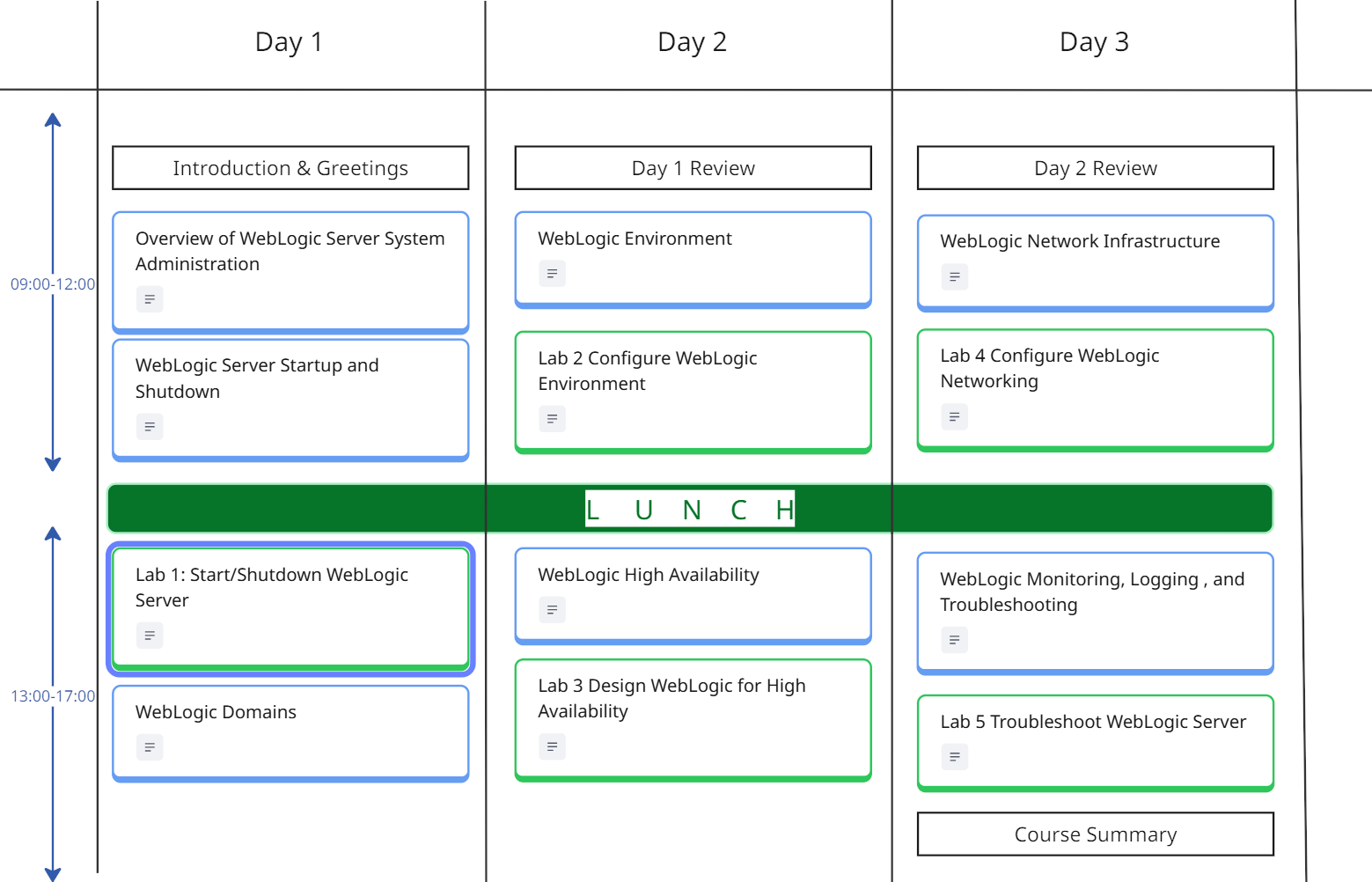
The WebLogic System Administration Course is a 5 days course, includes lectures, demos, and labs.
The following is guidelines for the instructor to organize the time pace with the students, subject to change based on students preference.
Breaks during the day follows the 106 rule, every 45-60m
*the 106 rule, indicates the human memory capacity to learn the new factual elements which is 106 facts before the memory could be reused.





Course Curriculum
Module 1: Overview of WebLogic Server System Administration
- WebLogic Server Architecture
- WebLogic Domains
- WebLogic Cluster
- WebLogic High Availability
- WebLogic Data Sources
- WebLogic Server Messaging
- WebLogic Security
- WebLogic Web Services
- Jakarta Enterprise Beans JEBs
- Monitoring, Diagnosing and Troubleshooting
Module 2:WebLogic Server Startup and Shutdown
- Overview of starting and stopping servers
- Understand the server life cycle
- Use Node Manager to control remote servers
- Starting and stopping servers in a dynamic cluster
- Use WebLogic Server Scripting Tool (WLST)
Module 3: WebLogic Domains
- WebLogic domains
- Manage WebLogic Domains
- Domain Templates
- WSL WebLogic Scripting Language
- WebLogic Clustering
- Coherence clusters
Module 4: WebLogic Environment
- WebLogic Logging Services
- Database Connectivity
- WebLogic Messaging
- WebLogic Persistent Store
- WebLogic Transactions
- Concurrent Resources
- WebLogic Tuxedo Connector
- Web Server Plug-ins
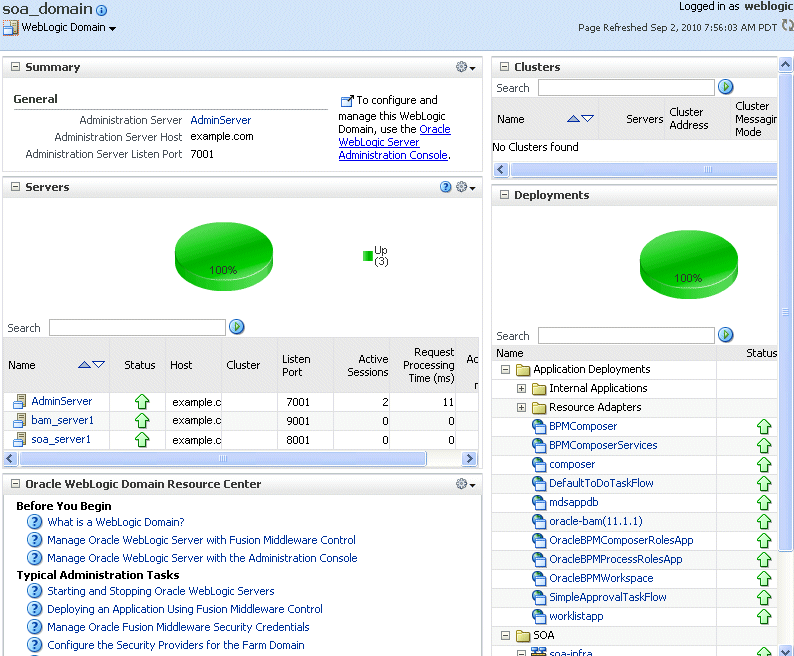

Module 5: WebLogic High Availability
- WebLogic Cluster Architecture
- Manage WebLogic Clusters
- Dynamic Clusters
- Session Persistence
- Manage Coherence Clusters
- Persistent Store for Clusters
Module 6: WebLogic Network Infrastructure
- Configure network resources
- Network Channels
- Port and Administration Channel
- Configuring Channels
- Custom Channels
- Configure Server Functionality
- Manage Server Overload
- Concurrent Managed Objects
- Batch Runtime
Module 7: WebLogic Monitoring, Logging , and Troubleshooting
- WebLogic Diagnostics Framework
- Logging Services
- SNMP Support
- Custom JMX Applications
- Jakarta Management APIs
Module 10: Course Summary
Calendar
Scroll through the months, and chose the right schedule for you, send us a standard request form register

