
Oracle Solaris 11 Advanced System Administration
 Consistent .
Backward compatibility to legacy applications guaranteed.
Yet modernized and engineered in features to meet the latest market trends- Practical Hands on Labs.
Many labs with hands on experience; practicing real challenging exercises
independently and supervised by your professional trainer - Simple .
Integrated lifecycle management technologies,
Experience Oracle Solaris Observability tools for real-time
and historical insight - Live Demos! .
With visual view of how the concepts can be realized using live data
and live practices by the instructor.
Thanks to the training Kata where the instructor leads and students
follow instructions step by step - Earn your recognition .
Your achievements count, you earn it,
a certificate of attendance is your reward - OS Security you can trust .
Engineered for cloud security,
Antimalware protection, system lockdown,
One step multinode compliance reporting
ORA-10128
Oracle Solaris is the trusted business platform that you depend on. Oracle Solaris 11 gives you consistent compatibility, is simple to use, and is designed to always be secure.
Oracle Solaris was engineered to ensure that the features meet the latest market trends while maintaining backward compatibility,
The Integrated lifecycle management technologies allows the administrators use single command to update the entire cloud installation clear down to the firmware and including all virtualized environments.
Oracle Solaris also engineered for cloud security at every level. Antimalware protection extends from hypervisor to application.
Overivew
This course teaches advanced topics in Solaris 11 system administration. The operating system will be Oracle Solaris 11.4. The course is taught on both SPARC and Intel-based servers utilizing LDoms and zones. This course prepares the student for the Oracle Certified Professional, Oracle Solaris 11 Advanced System Administration Exams, including the Upgrade to Oracle Solaris 11 System
Prerequisites
Knowledge
Students to this class are expected to have:
- Good understanding Operating Systems Basics
- Basic knowledge of
- Unix Operating System commands
- Bash/C Shell scripting
- File Management
- Networking and Security
- Basic understanding of computer operations skills :such as managing files
Technology
Depending on the delivery method of this course, the students should have :
- A Workstation with Internet browser capability such as (Chrome, Edge, or Safari)
- Good persistent internet connection without blocking firewalls(ideally non corporate firewall protected workstations)
The Labs
Labs are provided throughout the course and optionally can be extended for a 1 month period, students can practice the labs for unlimited times.
Labs covered in this course:
- Lab 1: Exploring Oracle Solaris 11.4
- Lab 2: User Accounts and Administration
- Lab 3: Network Security and Troubleshooting
- Lab 4: Managing Oracle Solaris Storage
- Lab 5: Oracle Solaris Virtualization
- Lab 6: Oracle Solaris Monitoring
- Lab 7: Operating System Security
Objectives
By the end of the course, students should be able to
-
Configure an Automated Install (AI) Server for Installation on Multiple Hosts, LDoms and Zones
-
Use Unified Archives to backup and restore the root pool
-
Utilize AI with Unified Archives for Disaster Recovery
-
Create a Custom OS Distribution Image using the distribution constructor
-
Configure Virtual Networking
-
Monitor and troubleshoot Oracle Solaris
-
Develop Application and Automate scripts to automate common administration tasks
-
Secure Oracle Solaris
Audience
This course is designed to assist and equip the students with the skills and knowledge that allows them to perfect their daily tasks with respect to operationalize and administer the CI/CD pipelines with confidence and capitalize the organization investment on business operation reliability.
- System Administrator: Help architect and implement IT infrastructure exploiting full potential of Oracle Solaris OS
- Solution Architect: to better understand how to leverage Cloud and on-premise IT capabilities.
- SRE – Site Reliability Engineers: Help develop adequate Service Level Objectives (SLO), Service Level Indicators(SLI), and Observability across the overall system
- Networking Engineers: Understands the networking limitations and requirements and the business impact of network architecture on business
- Security Engineers: Help identify threats and implement security best practices on Oracle Solaris OS
- DevOps Engineers: Help understand the application design components with reference to Oracle Solaris OS as hosting server or development workstation by exploring all full potentials of Oracle Solaris OS.
- Other Users: Understand in depth how to operation a reliable Operating systems for their day today office work
- Migration Engineers: Help plan the modernization of legacy platform and take full potential of Oracle Solaris platform.
- Systems Architects: Develop reliable architecture with Oracle Solaris OS.
Timeline
The Oracle Solaris Advanced System Administration Course is a 5 days course, includes lectures, demos, and workshops.
The following is guidelines for the instructor to organize the time pace with the students, subject to change based on students preference.
Breaks during the day follows the 106 rule, every 45-60m
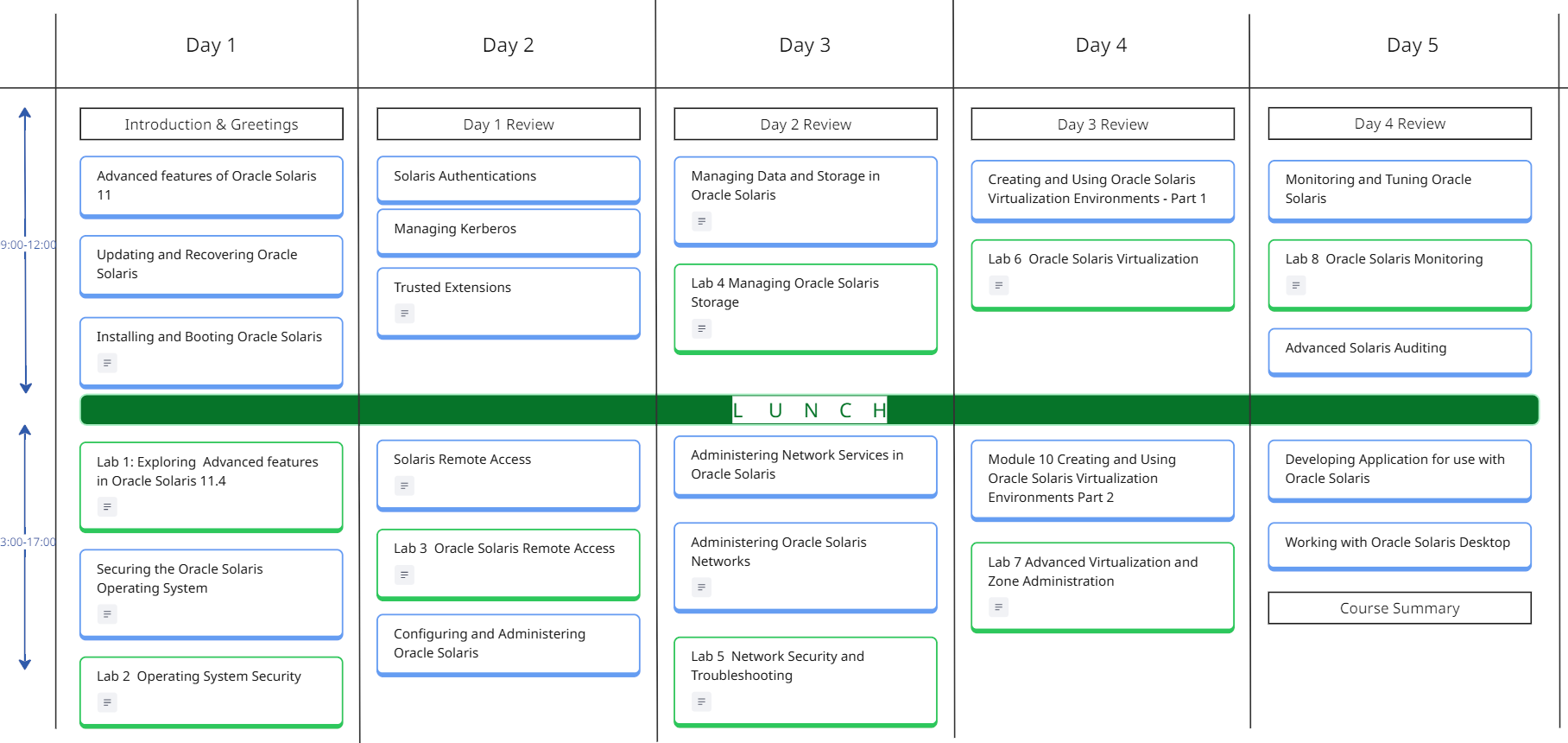
*the 106 rule, indicates the human memory capacity to learn the new factual elements which is 106 facts before the memory could be reused.



Course Curriculum
- Key features of Oracle Solaris 11.4
- Security and Compliance Features
- Data Management Features
- Networking Features
- Performance and Observability
- Virtualization Features
- System Management Features
- Installation and Software Management Features
- Enhancements for Developers
- Additional New Features
Updating and Recovering Oracle Solaris
- Updating Systems and Adding Software in Oracle Solaris 11.4
- Creating Package Repositories in Oracle Solaris 11.4
- Creating and Administering Oracle Solaris 11.4 Boot Environments
- Creating a Custom Oracle Solaris 11.4 Image
- Using Unified Archives for System Recovery and Cloning in Oracle Solaris 11.4
Installing and Booting Oracle Solaris
- Manually Installing an Oracle Solaris 11.4 System
- Automatically Installing Oracle Solaris 11.4 Systems
- Customizing Automated Installations With Manifests
- and Profiles
- Booting and Shutting Down Oracle Solaris 11.4 Systems
Securing the Oracle Solaris Operating System
- Security: An Oracle Solaris Differentiator
- Oracle Solaris 11.4 Security and Hardening Guidelines
- Oracle Solaris 11.4 Compliance Guide
- Securing the Network in Oracle Solaris 11.4
- Securing Systems and Attached Devices in Oracle Solaris 11.4
- Securing Files and Verifying File Integrity in Oracle Solaris 11.4
- Securing Users and Processes in Oracle Solaris 11.4
Solaris Authentications
- Using Pluggable Authentication Modules
- Using Simple Authentication and Security Layer
- Using Smart Cards for Multifactor Authentication in Oracle Solaris
- Using One-Time Passwords for Multifactor Authentication in Oracle Solaris
- Using Secure RPC on Oracle Solaris
- Managing Faults, Defects, and Alerts in Oracle Solaris 11.4
Oracle VTS (Validation Test Suite) Information Library
Managing Kerberos
- Kerberos on Oracle Solaris
- Planning for the Kerberos Service
- Configuring the Kerberos Service
- Users Using Kerberos
Trusted Extensions
- Initial Configuration of Trusted Extensions
- Administration of Trusted Extensions
- About Labels in Trusted Extensions
- Planning Labels in Trusted Extensions
- Creating a Label Encodings File
- Labeling Printer Output
- Customizing the LOCAL DEFINITIONS Section
- Trusted Extensions Developer’s Guide
Solaris Remote Access
- Introduction to SSH Remote Access
- Generating Private/Public Keys
- Firewall considerations for SSH
- Install public keys
- Use Private key to access remote systems
Configuring and Administering Oracle Solaris
- Introduction to Oracle Solaris 11.4 Administration
- Managing User Accounts and User Environments in Oracle Solaris 11.4
- Managing System Information, Processes, and Performance in Oracle Solaris 11.4
- Managing System Services in Oracle Solaris 11.4
- Using Puppet to Perform Configuration Management in Oracle Solaris 11.4
- Configuring and Managing Printing in Oracle Solaris 11.4
- Troubleshooting System Administration Issues in Oracle Solaris 11.4
- International Language Environments Guide for Oracle Solaris 11.4
Managing Data and Storage in Oracle Solaris
- Managing Devices in Oracle Solaris 11.4
- Managing File Systems in Oracle Solaris 11.4
- Managing ZFS File Systems in Oracle Solaris 11.4
- Managing SAN Devices and I/O Multipathing in Oracle Solaris 11.4
- Oracle Solaris I/O Multipathing and Storage Device Administration Cheatsheet
Administering Network Services in Oracle Solaris
- Introduction to Oracle Solaris 11.4 Network Services
- Managing Clock Synchronization in Oracle Solaris 11.4
- Managing Network File Systems in Oracle Solaris 11.4
- Working With DHCP in Oracle Solaris 11.4
- Managing IP Quality of Service in Oracle Solaris 11.4
- Managing sendmail Services in Oracle Solaris 11.4
- Managing Serial Networks Using UUCP and PPP in Oracle Solaris 11.4
- Managing Remote Systems in Oracle Solaris 11.4
- Working With Oracle Solaris 11.4 Directory and Naming Services: DNS and NIS
- Working With Oracle Solaris 11.4 Directory and Naming Services: LDAP
- Managing SMB File Sharing and Windows
- Interoperability in Oracle Solaris 11.4
- Oracle Solaris 11.4 Network File Sharing Cheatsheet
- Troubleshooting Network Administration Issues in Oracle Solaris 11.4
Administering Oracle Solaris Networks
- Strategies for Network Administration in Oracle Solaris 11.4
- Planning for Network Deployment in Oracle Solaris 11.4
- Configuring and Managing Network Components in Oracle Solaris 11.4
- Administering TCP/IP Networks, IPMP, and IP Tunnels in Oracle Solaris 11.4
- Managing Network Virtualization and Network Resources in Oracle Solaris 11.4
- Managing Network Datalinks in Oracle Solaris 11.4
- Configuring an Oracle Solaris 11.4 System as a Router or a Load Balancer
- Securing the Network in Oracle Solaris 11.4
- Troubleshooting Network Administration Issues in Oracle Solaris 11.4
Creating and Using Oracle Solaris Virtualization Environments Part 1
- Introduction to Oracle Solaris 11.4 Virtual Environments
- Introduction to Oracle Solaris Zones
- Creating and Using Oracle Solaris Zones
- Creating and Using Oracle Solaris Kernel Zones
Creating and Using Oracle Solaris Virtualization Environments Part 2
- Creating and Using Oracle Solaris 10 Zones
- Oracle Solaris Zones Configuration Resources
- Administering Resource Management in Oracle Solaris 11.4
Monitoring and Tuning Oracle Solaris
- Oracle Solaris 11.4 Tunable Parameters Reference Manual
- Using Oracle Solaris 11.4 StatsStore and System Web Interface
- Adding Custom Data to the Oracle Solaris 11.4 StatsStore and System Web Interface
- Oracle Solaris 11.4 DTrace (Dynamic Tracing) Guide
- Oracle Solaris Modular Debugger Guide
- Managing Faults, Defects, and Alerts in Oracle Solaris 11.4
- Oracle VTS (Validation Test Suite) Information Library
Advanced Oracle Solaris Auditing
- About Auditing in Oracle Solaris
- Planning for Auditing
- Managing the Audit Service
- Configuring the Formats of Audit Logs
- Viewing Audit Records
- Analyzing and Resolving Audit Issues
Developing Applications with Oracle Solaris
- Setting Up the Application Development Environment in Oracle Solaris 11.4
- Oracle Solaris 64-bit Developer’s Guide
Working With the Oracle Solaris Desktop
- Oracle Solaris 11.4 Desktop Accessibility Guide
- Oracle Solaris 11.4 Desktop
Calendar
Scroll through the months, and chose the right schedule for you, send us a standard request form register