
Oracle Solaris 11 Performance Management
 Consistent .
Backward compatibility to legacy applications guaranteed.
Yet modernized and engineered in features to meet the latest market trends- Practical Hands on Labs.
Many labs with hands on experience; practicing real challenging exercises
independently and supervised by your professional trainer - Simple .
Integrated lifecycle management technologies,
Experience Oracle Solaris Observability tools for real-time
and historical insight - Live Demos! .
With visual view of how the concepts can be realized using live data
and live practices by the instructor.
Thanks to the training Kata where the instructor leads and students
follow instructions step by step - Earn your recognition .
Your achievements count, you earn it,
a certificate of attendance is your reward - OS Security you can trust .
Engineered for cloud security,
Antimalware protection, system lockdown,
One step multinode compliance reporting
ORA-10128
Oracle Solaris Performance Management involves monitoring, analyzing, and tuning system resources—such as CPU, memory, networking, and storage—to ensure optimal enterprise workload efficiency. Administrators utilize built-in OS commands, diagnostic frameworks like DTrace, and broader platforms like Oracle Enterprise Manager Ops Center to track activity
Overivew
This course will provide a summary of tools and techniques used to monitor the performance of the hardware and operating system in an Oracle Solaris 11 operating environment. This course will also provide techniques used to tune and optimize the performance of the Oracle Solaris 11 operating environment. The student will use tools that are available in the standard release of the Solaris 11 OE
Prerequisites
Knowledge
Students to this class are expected to have:
- Good understanding Operating Systems Basics
- Basic knowledge of
- Unix Operating System commands
- Bash/C Shell scripting
- File Management
- Networking and Security
- Basic understanding of computer operations skills :such as managing files
Technology
Depending on the delivery method of this course, the students should have :
- A Workstation with Internet browser capability such as (Chrome, Edge, or Safari)
- Good persistent internet connection without blocking firewalls(ideally non corporate firewall protected workstations)
The Labs
Labs are provided throughout the course and optionally can be extended for a 1 month period, students can practice the labs for unlimited times.
Labs covered in this course:
- Lab 1: Exploring Oracle Solaris 11.4
- Lab 2: User Accounts and Administration
- Lab 3: Network Security and Troubleshooting
- Lab 4: Managing Oracle Solaris Storage
- Lab 5: Oracle Solaris Virtualization
- Lab 6: Oracle Solaris Monitoring
- Lab 7: Operating System Security
Objectives
By the end of the course, students should be able to
-
Describe the features of Oracle Solaris 11
-
Install and Manage Oracle Solaris booting, shutdown, and manage profiles
-
Able to perform System Recovery of Oracle Solaris using booth environments and custom images
-
Fine tune Oracle Solaris and Perform daily adminstration tasks
-
Manage Data and STorage in Oracle Solaris
-
Monitor and troubleshoot Oracle Solaris
-
Develop Application and Automate scripts to automate common administration tasks
-
Secure Oracle Solaris
Audience
This course is designed to assist and equip the students with the skills and knowledge that allows them to perfect their daily tasks with respect to operationalize and administer the CI/CD pipelines with confidence and capitalize the organization investment on business operation reliability.
- System Administrator: Help architect and implement IT infrastructure exploiting full potential of Oracle Solaris OS
- Solution Architect: to better understand how to leverage Cloud and on-premise IT capabilities.
- SRE – Site Reliability Engineers: Help develop adequate Service Level Objectives (SLO), Service Level Indicators(SLI), and Observability across the overall system
- Networking Engineers: Understands the networking limitations and requirements and the business impact of network architecture on business
- Security Engineers: Help identify threats and implement security best practices on Oracle Solaris OS
- DevOps Engineers: Help understand the application design components with reference to Oracle Solaris OS as hosting server or development workstation by exploring all full potentials of Oracle Solaris OS.
- Other Users: Understand in depth how to operation a reliable Operating systems for their day today office work
- Migration Engineers: Help plan the modernization of legacy platform and take full potential of Oracle Solaris platform.
- Systems Architects: Develop reliable architecture with Oracle Solaris OS.
Timeline
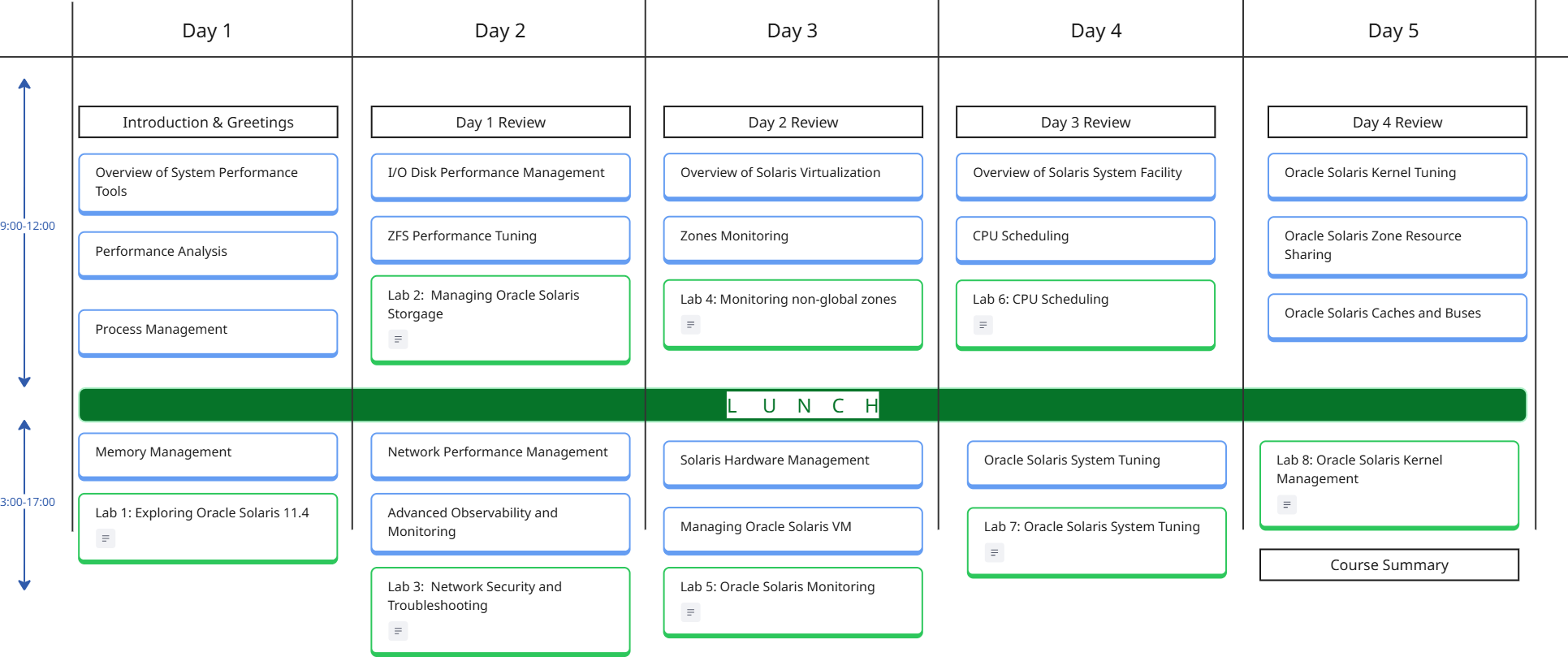
The Oracle Solaris Performance Management Course is a 5 days course, includes lectures, demos, and workshops.
The following is guidelines for the instructor to organize the time pace with the students, subject to change based on students preference.
Breaks during the day follows the 106 rule, every 45-60m
*the 106 rule, indicates the human memory capacity to learn the new factual elements which is 106 facts before the memory could be reused.






Course Curriculum
- Introduction to Oracle Solaris 11.4 Performance Management
- Performance Analysis Concepts
- Monitoring tools in Oracle Solaris 11
- System Configuration Assessment
Performance Analysis
- Overview of Performance Analysis
- Performance Analysis Tools
- kstat Monitoring Tools
- procfs Monitoring Tools
- DTrace
- Other Tools
Process Management
- Monitoring Processes
- The /proc File System (PROCFS) Tools
- Controlling & Terminating Processes
- Workload Hierarchies and Resource Controls
Memory Management
- Paging and Virtual Memory
- Physical Memory Control
- Shared Memory Mechanisms
- Application Tunables
I/O Disk Performance Management
- Core Management Utilities
- I/O Optimization & Multipathing
- format Utility
- ZFS Pools
ZFS Performance Tuning
- Optimize Pool Layout & Hardware
- Match Workloads to Record Sizes
- Core Tuning & Property Tweaks
- Advanced Caching (ARC & L2ARC)
Netwrok Performance Management
- Built-in Netwrk Monitoring Tools
- Performance Tuning Parameters
- High Availability & Load Balancing
Advanced Observability and Monitoring
- Introduction to Oracle Solaris 11.4 Observability
- Core Tools and Frameworks
- Performance Metrics and Actions
- DTrace
Overview of Solaris Virtualization
- Introduction to Oracle Solaris 11.4 Zones
- Kernel Zones
- Non-Global Zones
- Solaris 10 Zones
Zones Monitoring
- Native Solaris Zone Monitoring tools
- Enterprise Monitoring Platform
- Location of Oracle Solaris Zone Information
- Actions for Zones
- Target Navigation for Zones
- Zone Platform Metrics
- Incidents for Zones
- Managing Metrics and Incident Notifications for Zones
- Administering Zones
Solaris Hardware Management
- Host-to-ILOM Interconnect
- Firmware Updates
- Storage Configuration
- SNMP Monitoring Agent
Oracle Solaris VM
- Oracle Solaris 11.4 Virtualization Overview
- Hypervisor and Logical Domains
- Control Domains
- Guest Domains
- Overview of the Oracle VM Server for SPARC Software
- Logical Domains Manager
Overview of Solaris System Facility
- Overview of SMF
- SMF Concepts and Components
- SMF Capabilities
- FMRI (Fault Management Resource Identifier)
- Automatic Restarts
- Dependencies
- Delegation
- Service Logs
- Repositories
- Configuration Files and SMF Services
- Administering Services
- Configuring Services
- Configuring Multiple Systems
CPU Scheduling
- Overview of Fare Share Scheduler FSS
- CPU Share Definition
- CPU Shares and Process State
- CPU Share Versus Utilization
- FSS Configuration
- Scheduling Classes
- Priority Control
- Configuration Tables
- CPU Performance Metrics
- Administer FSS Tasks
Oracle Solaris System Tuning
- Overview of Oracle Solaris System Tuning
- Kernel and File System
- Networking ndd & routeadm
- Observability DTrace
- /etc/system.d/ Directory files
- kmdb Utility
- mdb Command
- Tuning Format of Tunable Parameters Descriiptions
- Vieweing Oracle Solaris System Configuration Information
Oracle Solaris KernelTuning
- General Kernel and Memory Parameters
- fsflush and Related Parameters
- Process-Sizing Parameters
- Paging-Related Parameters
- Kernel Memory Allocator
- General Driver Parameters
- Network Driver Parameters
- General I/O Parameters
- General File System Parameters
- TMPFS Parameters
- Pseudo Terminals
- STREAMS Parameters
- System V Message Queues
- System V Semaphores
- Timer Behavior
- SPARC: Platform Specific Parameters
- Locality Group Parameters
Oracle Solaris Zone Resource Sharing
- Overview of Zone Resources
- CPU Resource Sharing Strategies
- Network Resource Sharing
- Memory Resource Sharing
- Storage Sharing and ISolation
Oracle Solaris Caches and Buses
- Hardware Caches
- Hardware Buses
- Cache Management Tools
- Performance Assessment Tools
Calendar
Scroll through the months, and chose the right schedule for you, send us a standard request form register