
Oracle Solaris 11.4 Fundamentals
 Consistent .
Backward compatibility to legacy applications guaranteed.
Yet modernized and engineered in features to meet the latest market trends- Practical Hands on Labs.
Many labs with hands on experience; practicing real challenging exercises
independently and supervised by your professional trainer - Simple .
Integrated lifecycle management technologies,
Experience Oracle Solaris Observability tools for real-time
and historical insight - Live Demos! .
With visual view of how the concepts can be realized using live data
and live practices by the instructor.
Thanks to the training Kata where the instructor leads and students
follow instructions step by step - Earn your recognition .
Your achievements count, you earn it,
a certificate of attendance is your reward - OS Security you can trust .
Engineered for cloud security,
Antimalware protection, system lockdown,
One step multinode compliance reporting
ORA-10128
Oracle Solaris is the trusted business platform that you depend on. Oracle Solaris 11 gives you consistent compatibility, is simple to use, and is designed to always be secure.
Oracle Solaris was engineered to ensure that the features meet the latest market trends while maintaining backward compatibility,
The Integrated lifecycle management technologies allows the administrators use single command to update the entire cloud installation clear down to the firmware and including all virtualized environments.
Oracle Solaris also engineered for cloud security at every level. Antimalware protection extends from hypervisor to application.
Overivew
Solaris Fundamentals This course provides training on how to use Unix commands and basic Solaris commands and introduces trainee to Common Desktop Environment (CDE).
Prerequisites
Knowledge
Students to this class are expected to have:
- Good understanding Operating Systems Basics
- Basic knowledge of
- Unix Operating System commands
- Bash/C Shell scripting
- File Management
- Networking and Security
- Basic understanding of computer operations skills :such as managing files
Technology
Depending on the delivery method of this course, the students should have :
- A Workstation with Internet browser capability such as (Chrome, Edge, or Safari)
- Good persistent internet connection without blocking firewalls(ideally non corporate firewall protected workstations)
The Labs
Labs are provided throughout the course and optionally can be extended for a 1 month period, students can practice the labs for unlimited times.
Labs covered in this course:
- Lab 1: Exploring Oracle Solaris 11.4
- Lab 2: User Accounts and Administration
- Lab 3: Network Security and Troubleshooting
- Lab 4: Managing Oracle Solaris Storage
- Lab 5: Oracle Solaris Virtualization
- Lab 6: Oracle Solaris Monitoring
- Lab 7: Operating System Security
Objectives
By the end of the course, students should be able to
-
Describe the features of Oracle Solaris 11
-
Understand the Oracle Solaris File system
-
Perform basic file editing
-
Use the GNome User interface
-
Manage GNome Desktop
-
Perform basic bash commands
-
Describe the different shells, C-Shell, Bash, KSH
-
Basics of Oracle Solaris Virtualization
Audience
This course is designed to assist and equip the students with the skills and knowledge that allows them to perfect their daily tasks with respect to operationalize and administer the CI/CD pipelines with confidence and capitalize the organization investment on business operation reliability.
- System Administrator: Help architect and implement IT infrastructure exploiting full potential of Oracle Solaris OS
- Solution Architect: to better understand how to leverage Cloud and on-premise IT capabilities.
- SRE – Site Reliability Engineers: Help develop adequate Service Level Objectives (SLO), Service Level Indicators(SLI), and Observability across the overall system
- Networking Engineers: Understands the networking limitations and requirements and the business impact of network architecture on business
- Security Engineers: Help identify threats and implement security best practices on Oracle Solaris OS
- DevOps Engineers: Help understand the application design components with reference to Oracle Solaris OS as hosting server or development workstation by exploring all full potentials of Oracle Solaris OS.
- Other Users: Understand in depth how to operation a reliable Operating systems for their day today office work
- Migration Engineers: Help plan the modernization of legacy platform and take full potential of Oracle Solaris platform.
- Systems Architects: Develop reliable architecture with Oracle Solaris OS.
Timeline
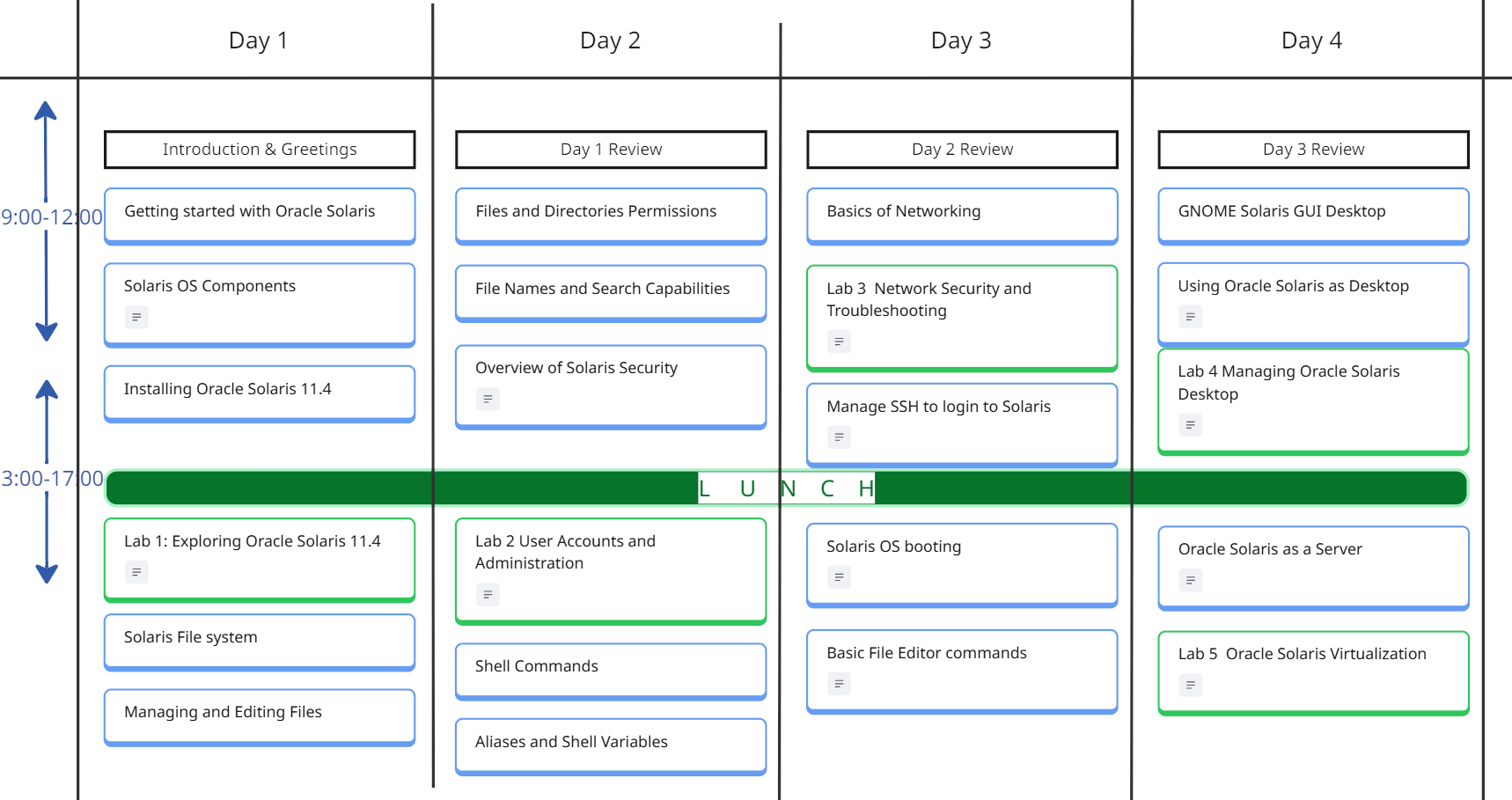
The Oracle Solaris Course is a 5 days course, includes lectures, demos, and workshops.
The following is guidelines for the instructor to organize the time pace with the students, subject to change based on students preference.
Breaks during the day follows the 106 rule, every 45-60m
*the 106 rule, indicates the human memory capacity to learn the new factual elements which is 106 facts before the memory could be reused.



Course Curriculum
- Introduction to Oracle Solaris 11.4
- Understand Oracle Solaris Architecture
- Oracle Solaris 11.4 Offerings
- New features of Oracle Solaris 11.4
- Overview of Package Repository
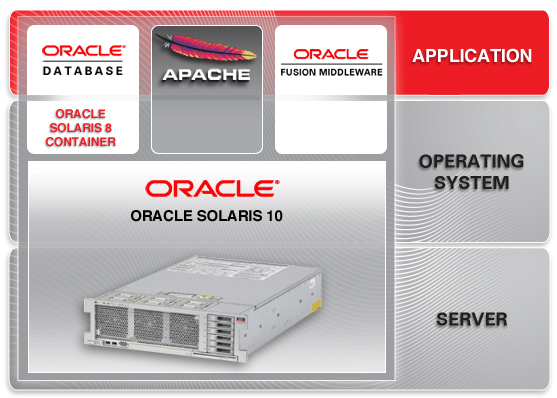
Solaris OS Components
- Core and Kernel
- File System and Storage
- Service Management and Security
- Networking and Diagnostics
- User Environment
- Hardware compatibility
- Solaris Clusters
- Solaris Developer Studio
Installing Oracle Solaris 11.4
- Manually Installing an Oracle Solaris 11.4 System
- Automatically Installing Oracle Solaris 11.4 Systems
- Customizing Automated Installations With Manifests and Profiles
- Booting and Shutting Down Oracle Solaris 11.4 Systems
Solaris File System
- Managing Devices in Oracle Solaris 11.4
- Managing File Systems in Oracle Solaris 11.4
- Managing ZFS File Systems in Oracle Solaris 11.4
- Managing SAN Devices and I/O Multipathing in Oracle Solaris 11.4
- Oracle Solaris I/O Multipathing and Storage Device Administration Cheatshe
Managing and Editing Files
- Display file contents
- Set permissions on files
- Manage files in /etc folder
- Superuser access to protected files
Files and Directory Permissions
- Files and Directory permissions in Solaris OS
- User Owner and Other permissions
- User masks
- sudo command
File names and Search Capabilities
- environment variables
- PATH environment variable
- search for files by name
- search for files by other attributes
- pass search results into a pipe
- set file search attributes
Overview of Solaris Security
- Operating System Security Fundamentals
- Permission Security Levels
- User Groups
- Superuser
- Authentication and Authorization
- Networking Security
- Storage Security
- Process Security
Shell Commands
- Introduction to Oracle Solaris 11.4 shells
- Shell Commands
- types of Oracle Solaris Shells
- C-Shell
- ksh
- bash
Aliases and Shell variables
- Automating daily operation commands
- cron jobs
- Basic programming controls
- if statement
- case statement
- loops
- Aliases
- send emails
- Developer’s Guide
Basic Networking
- Network topology
- Network Layers
- TCP/IP Addressing
- Network basic troubleshooting
- Securing Networks with firewall
Manage SSH to login to Solaris
- Overview of opnessh Secure Shell SSH
- Anatomy of .ssh folder
- ssh configuration files
- Generating ssh Keys
- Installing ssh keys
- Enabling firewalls
- General Security practices for remote login
- login remotely using ssh
- Copy and move files with scp
Solaris OS Booting
- Boot record
- Multi-boot Solaris OS
- Change boot options
Basic File Editor commands
- Text Editor Commands
- Introduction to vim editor
- Display text files
- Follow log files
- Stream files using pipe
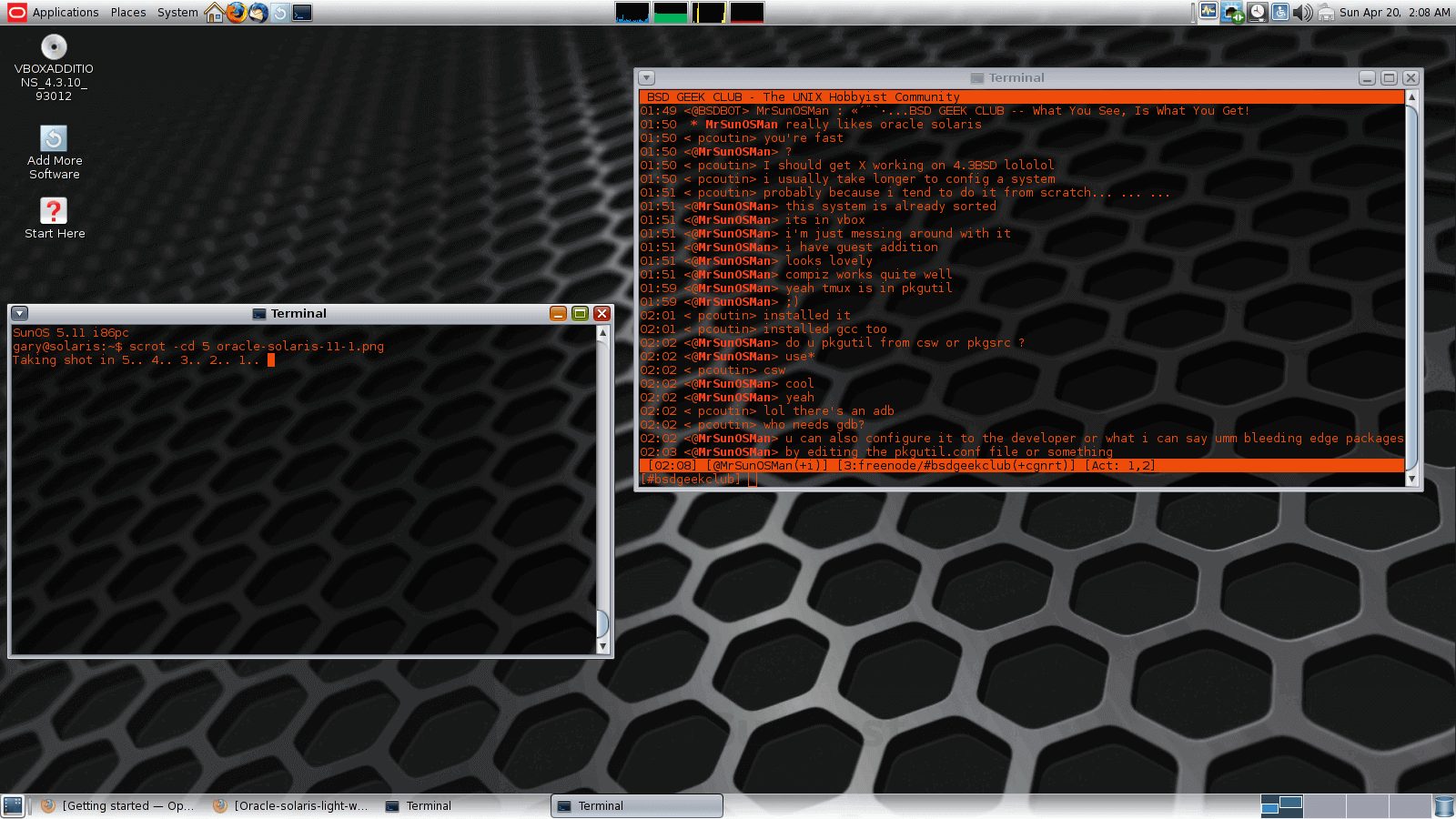
GNome Solaris GUI Desktop
- Starting GNome as the default OS
- GNome Desktop
- GNome utilties
- Exploring Network Neighbourhood
- GNome Settings
- GNome Background
- GNome lock screen
- Change Settings in GNome
- Remote Connection with VNC
GNome Solaris GUI Desktop
- Organizing Files and Folders
- Printing Files using CUP
- Sending emails with sendmail
- Word processors
- Online Internet Browsing with Firefox
- Oracle Solaris Developer Studio
- Personalize Settings
GNome Solaris GUI Desktop
- Server Architectures
- High Availability with Solaris OS
- Server Networking
- Virtualization with Zones
- Oracle Solaris Cluster
Calendar
Scroll through the months, and chose the right schedule for you, send us a standard request form register